Data about current and planned future elevator outages is becoming available in a standardized
format (SIRI SX and SIRI FM), in Germany and Switzerland
at least. That’s crucial information especially for wheelchair routing, and MOTIS,
the routing engine used by Transitous, can take this into consideration. However, it doesn’t support
the SIRI format yet.
The main challenge here is identifying the affected elevator:
The German SIRI FM data uses DIID identifiers for elevators. While those also appear in the
OpenStation dataset, we currently have neither geographic
coordinates for them nor are DIIDs referenced in OpenStreetMap. This leaves us
with no practical way to map the elevator status information to an elevator in the OSM data for routing, at this point.
The Swiss SIRI SX data uses OSM node/way ids for elevators. While there are concerns about the stability
of those as identifiers, this should nevertheless work sufficiently in the majority of cases.
NeTEx
So far all static schedule data used by Transitous is using the GTFS format. That’s a relatively
simple set of CSV files in a ZIP. There’s a another format for this though, NeTEx.
It’s a vastly more complex and rather verbose XML, but it can also model a number of things that cannot be represented
in GTFS so far, such as vehicle attributes.
MOTIS v2.8 added initial support for NeTEx, but due to the complexity of the format and its tendency to offer
multiple different ways to model the same thing it remains a case-by-case investigation whether a specific NeTEx
feed is working sufficiently well.
We looked at three feeds that seem particularly promising at this point. While using NeTEx there would
give us clear benefits, all of them would also introduce regressions over the status quo that need to be addressed first.
DELFI NeTEx feed for Germany:
Contains correct train names for non-IC/non-ICE long distance trains (EC, ECE, RJ, RJX, etc).
Contains vehicle attributes (on a similar level as provided by DB’s website).
Less details regarding bus stops compared to GTFS, e.g. missing many platform names.
SNCF NeTEx feed for France:
Would finally give us proper route types and train names for TGV, IC and TER trains.
Misses some trips included in the corresponding GTFS feed.
Realtime data doesn’t match against the NeTEx feed.
We tested a workaround by importing both the NeTEx and GTFS feeds in the right order
and have MOTIS merge the common trips correctly. This works as such, but identified two pre-existing merging issues
that need to be fixed in MOTIS first.
Swiss national NeTEx feed:
Would give us train numbers for international trains and at least some vehicle attributes.
Matching rates against realtime data are lower than with GTFS. Workarounds like currently
in use in Germany might help, augmenting the schedule data with stop registry data.
While it will still take a bit of time before any of those feeds will enter production on Transitous,
we have started to prepare Transitous’ import pipeline and documentation to not exclusively assume
GTFS as the input format anymore.
And more…
There were plenty more topics discussed beyond those two:
Making the Grafana dashboard more useful for feed/region maintainers.
Using Wikidata as the canonical source for data augmentation, and how we could
reliably match GTFS agencies or routes to Wikidata items.
Requirements for a routing profile for blind users, such as routing along tactile and acoustic markers and
minimizing steps and crossings.
Implementation details for adding “on-trip” queries, ie. routing requests that don’t start
from a location but on board of a vehicle.
Resolving duplicates between multiple GBFS v3 aggregated feeds.
And to end this with a screenshot, we also fixed the font rendering on the Transitous map which
was missing labels in e.g. Egypt, Georgia and Thailand.
Thai script labels on the map in Bangkok.
Upcoming events
There’s several more opportunities in the upcoming weeks to meet members of the Transitous community:
This week we closed the door on features for Plasma 6.6, which opened another one for those features to land in 6.7. As a result, several features were merged for Plasma 6.7, including some particularly juicy ones!
As for Plasma 6.6, this starts the one-month period where the core Plasma team focuses almost entirely on fixing bugs. As you’ll see below, we already fixed quite a few this week! So there’s a huge amount of stuff to go over, and let’s get right to it:
Added a switch to the Brightness and Color widget that lets you instantly go from light mode to dark mode (or vice versa)! (Kai Uwe Broulik, powerdevil MR #576)
(At some point we’ll add a nice cross-fade transition here, too.)
Added a global push-to-talk feature: if you set a push-to-talk key, all microphones will be muted until the specified key is held down. (Kai Uwe Broulik, Aleix Pol Gonzalez, and Shubham Arora, plasma-pa MR #394, kglobalaccel MR #41, and plasma-workspace MR #6126)
Notable UI Improvements
Plasma 6.5.6
The HDR calibration wizard now temporarily disables Night Light while calibrating, to ensure that you get an accurate result. (Xaver Hugl, kscreen MR #448)
Plasma 6.6.0
Mounting a removable disk no longer performs a file system scan by default; now this is a manual action you initiate from the expanded actions list. (Akseli Lahtinen, KDE Bug #505852)
The screen chooser dialog now includes a search/filter field so you can easily find a screen by name even when there are a zillion windows open. (Harald Sitter, xdg-desktop-portal-kde MR #506)
Kicker’s search results no longer flicker or resize while typing, keeping columns stable during searches for a smoother and snappier experience. (Christoph Wolk, plasma-desktop MR #3439)
HDR Calibrator now offers a summary page with a setting to better support Windows HDR applications and games. (Xaver Hugl, kscreen MR #443)
Replaced some technical gobbledygook in the titles of Bluetooth status and error notifications with more relevant and user-friendly text. (Nate Graham, bluedevil MR #238)
(The body text isn’t great either, but that’s also being worked on!)
If you happen to have a keyboard or other input device with “Seek Forwards” and “Seek Backwards” buttons, pressing them now works as expected out of the box. (Vlad Zahorodnii, KDE Bug #514680)
Plasma 6.7.0
System Settings’ Game Controller, Mouse, and Touchpad pages now only appear when the devices they configure are present. (Alexander Wilms, plasma-desktop MR #3436)
Discover now shows sub-categories in its “Games” group for game launchers and game tools. (Jakob Dev, discover MR #1224)
On System Settings’ Accessibility page, the Mouse Navigation tooltip now explains how to switch mouse click modes with the numeric keypad. (Jaimukund Bhan, KDE Bug #505687)
Searching for “memory” now turns up the System Monitor app in search results. (Nicolas Fella, plasma-workspace MR #6194)
Frameworks 6.23
Improved the touch-friendliness of open/save dialogs. (Méven Car, KDE Bug #513606)
Improved the icon selection algorithm for missing icons so that it no longer returns downscaled versions of much larger icons, which may have a completely different style. (Alexander Wilms, KDE Bug #466678)
By default, sidebars and left edge drawers in Kirigami-using apps now have exactly the width needed to avoid being too wide or too narrow. Some apps still override the default width, and that will need to be un-done now, so expect the weirdly-sized sidebars to get fixed over time, rather than all at once when you upgrade to Frameworks 6.23. (Marco Martin, KDE Bug #505693)
KDE Gear 26.04.0
System Settings’ pages related to audio CDs (if you have them installed) now only appear when the computer has any optical drives. (Nate Graham, KDE Bug #513661 and KDE Bug #513664)
Notable Bug Fixes
Plasma 6.5.5
Fixed a case where KWin could crash on launch when the GPU did something weird when trying to render screencasts or window thumbnails. (Xaver Hugl, KDE Bug #513710)
Fixed an issue that made the fingerprint enrollment dialog’s “Add” button go missing if you canceled enrollment and then immediately re-opened the dialog. (Christoph Wolk, KDE Bug #514088)
Fixed an issue that sometimes made Weather Report widget’s tooltip use the wrong unit and display numbers with excessive decimal places. (Ismael Asensio, KDE Bug #514419)
Fixed an issue that made System Settings’ search field sometimes not show the proper language-specific placeholder text. (Albert Astals Cid, KDE Bug #512187)
Plasma 6.5.6
Fixed one of the top Plasma crashes that could happen when turning off certain screens. (Vlad Zahorodnii, KDE Bug #511757)
Fixed a crash in System Settings’ Game Controller page when using certain devices and versions of the SDL library. (David Edmundson, KDE Bug #511859)
If you have multiple Plasma panels, clicking on different ones over and over again while in edit mode no longer makes multiple panel edit dialogs appear. (Marco Martin, KDE Bug #513135)
Plasma 6.6.0
Fixed a KWin crash that could happen when waking up a laptop connected to an external screen. (Xaver Hugl, KDE Bug #514229)
Fixed an issue relating to focus on the lock screen with multi-monitor setups. (Oliver Beard, KDE Bug #512028)
Discover’s window no longer becomes un-maximized when any popup dialogs appear. (Akseli Lahtinen, KDE Bug #503801)
Having an exotic network setup or a lot of Docker containers no longer breaks the layout of System Settings’ Remote Desktop page while the feature is turned on. (Christoph Wolk, KDE Bug #513504)
Plasma 6.7.0
If you’ve turned on the login sound, it now plays at the right time. (Kai Uwe Broulik, KDE Bug #510923)
Frameworks 6.22.1
Fixed a regression that made KDE Connect crash due to clipboard shenanigans. (Nicolas Fella, KDE Bug #514512)
Frameworks 6.23
Fixed two issues with tooltips that could sometimes cause them to be offset or rapidly appear and disappear in the Kickoff Application Launcher widget. (Alexey Rochev, KDE Bug #510860 and KDE Bug #511875)
Fixed some bugs and visual glitches with certain sidebars and list items in Kirigami-based apps when using an RTL language like Arabic or Hebrew. (Marco Martin and Christoph Wolk, kirigami MR #2027 and kirigami MR #2026)
Fixed a strange issue that could cause notifications from the Quod Libet music player specifically to stop appearing. (Alexander Wilms, KDE Bug #489910)
Symbolic icons for KDE Connect now re-color themselves properly when using a non-default color scheme. (Ángel Navarro, breeze-icons MR #522)
Qt 6.10.3
Fixed two of the most common Plasma crashes that were caused by Qt’s QML Compiler doing something weird under the hood. (Ulf Hermann, KDE Bug #513527 and KDE Bug #513012)
Notable in Performance & Technical
Plasma 6.6.0
Implemented version 2 of the Wayland color management protocol. (Xaver Hugl, kwin MR #8033)
Reduced some visual glitches in Firefox when turning on its off-by-default HDR mode. (Xaver Hugl, KDE Bug #514599)
Plasma 6.7.0
Implemented support for network activity monitoring on FreeBSD in the System Monitor app and widgets. (Jesper Schmitz Mouridsen, ksystemstats MR #41)
How You Can Help
Since the Plasma 6.6 beta period has commenced, this is a great time to submit bug reports for all the niggling issues you’ve been suffering with but haven’t formally reported yet. We’re focusing more than usual on bug triage too, so your reports will be seen.
In addition, “This Week in Plasma” needs your help! Publishing these posts is time-consuming and needs community assistance to be sustainable. Right now there are two ways to help:
Beyond that, you can help KDE by directly getting involved in any other projects. Donating time is actually more impactful than donating money. Each contributor makes a huge difference in KDE — you are not a number or a cog in a machine! You don’t have to be a programmer, either; many other opportunities exist.
You can also help out by making a donation! This helps cover operational costs, salaries, travel expenses for contributors, and in general just keep KDE bringing Free Software to the world.
To get a new Plasma feature or a bugfix mentioned here
KDE Ni! OS is a custom flavour
(configuration, not a separate distribution) of NixOS that showcases KDE software. It
builds on NixOS with the aim to reimplement the same features other
popular immutable distributions have, while providing a first-class KDE
Plasma setup.
The Plasma Login Manager support has been merged into Ni! OS.
If you want to use it, there are two prerequisites:
you are using Wayland, not X11; and
you are on unstable NixOS.
It is in the “works for me” state. I don’t use auto-login,
virtual keyboard, etc.
Going unstable
If you are on the stable channel, which would surprise me as
you’re reading this post, it is easy to switch to unstable just
by running these commands as root user (sudo,
or su, or…).
This will switch you to the unstable version of NixOS.
Mind that, as NixOS is an immutable distribution, you can easily boot
back into the stable version – the previous version of your system is
still accessible in the bootloader menu.
Switching from
SDDM to the Plasma Login Manager
There’s a new option in Ni! OS called experimental.use_plasma_login_manager.
The only thing you need to do in order to switch from SDDM to the Plasma
Login Manager is to set it to true, and just
switch your setup to the new configuration with:
nixos-rebuild switch
Plasma Login Manager on Ni! OS
Switching back is also trivial – just change the value back to
false and do the switch again.
There and back again
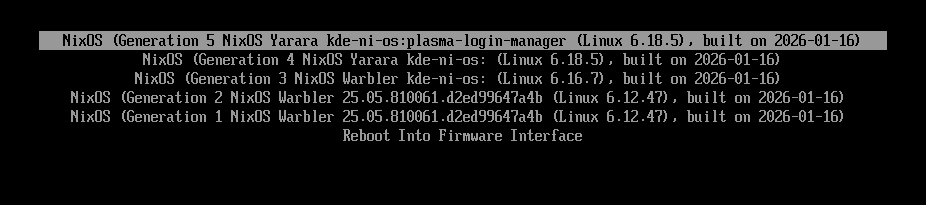
One new thing in Ni! OS is a custom label for the versions of the
system (derivations in NixOS terminology).
If you enable an experimental feature such as the Plasma Login
Manager, the label will clearly denote that. It makes it easy to get
back to a version without the experimental features enabled.
As you can see in the following screenshot, the default label is
kde-ni-os and all enabled experimental features are
appended to it – when enabling the Plasma Login Manager, the label
becomes kde-ni-os:plasma-login-manager. These labels can be
seen in the following screenshot:
Boot menu with labels shown
[edit] Upstream
Was notified by NixOS KDE maintainer K900, that PLM will officially
become a part of nixpkgs as Plasma 6.5.5 gets updated to 6.6.
Clearly the regulators don’t really understand the level of intrusiveness they’re unleashing with mandating age gates. This is one more layer of surveillance for large parts of the population.
This is a very rich article. There’s indeed more and more a rift between Open Source projects used by hyperscalers and the ones used by smaller businesses and individuals. You likely want to aim for the latter.
Mailing lists vs Discourse forums: open source communities or commodities?
Tags: tech, foss, community, email
Interesting points. Forums are clearly not good replacements for mailing lists. They might be a good complementary to mailing lists but both have very different affordances.
I agree with this so much. It’s another one of those I feel I could have written. I have a hard time thinking I could use the current crop of “inference as a service” while they carry so many ethical issues.
There is a real question about the training data used for the coding assistant models. It’s been a problem from the start raising ethical concerns, now it shows up with a different symptom.
I’m not sure the legal case is completely lost even though chances are slim. The arguments here are worth mulling over though. There’s really an ethical factor to consider.
This has been documented for a long while. Of course, it’s been followed by an unhealthy fascination for the “Toyota way”. This kind of cargo cult of course lead you nowhere to doing things properly. And yet, now that the dust settled, there are good lessons to learn from Toyota management back then.
Happy New Year! The first maintenance release of the 25.12 series is with the usual batch of stability fixes and workflow improvements. Highlights of this release include further polishing of the new welcome screen, added AMF encoding profile for Windows, fixes to audio capture and effects alongside numerous smaller improvements throughout the interface. See changelog for more details.
This post describes an experiment using Qt 6.7’s REST APIs to explore Stripe’s payment model, and what I learned building a small desktop developer tool.
Recent Qt releases have included several conveniences for developing clients of remote REST APIs. I recently tried it out with the Stripe payments REST API to get to grips with the Qt REST API in the real world. The overloading of the term API is unhelpful, I find, but hopefully not too confusing here.
As with almost everything I try out, I created Qt desktop tooling as a developer aid to exploring the Stripe API and its behavior. Naming things is hard, but given that I want to put a “Q” in the name, googling “cute stripes” gives lots of hits about fashion, and the other too-obvious-to-say pun, I’ve pushed it to GitHub as “Qashmere“:
setAlternatingRowColors(true);
Developers using REST APIs will generally be familiar with existing tooling such as Postman and Bruno, for synthesizing calls to collections of REST APIs. Indeed, Qashmere uses the Stripe Postman JSON definition to present the collection of APIs and parameters. Such tools have scripting interfaces and state to create workflows that a client of the REST API needs to support, like “create a payment, get the id of the payment back from the REST API and then cancel the payment with the id”, or “create a payment, get the id of the payment back from the REST API and then confirm it by id with a given credit card”.
So why create Qashmere? In addition to REST APIs, Stripe maintains objects which change state over time. The objects remain at REST until acted on by an external force, and when such an action happens a notification is sent to clients about those state changes, giving them a chance to react. I wanted to be able to collect the REST requests/responses and the notified events and present them as they relate to the Stripe objects. Postman doesn’t know about events or about Stripe objects in particular, except that it is possible to write a script in Postman to extract the object which is part of a JSON payload. Postman also doesn’t know that if a Payment Intent is created, there are a subset of next steps which could be in a workflow, such as cancel, capture or confirm payment etc.
Something that I discovered in the course of trying this out is that when I confirm a Payment Intent, a new Charge object is created and sent to me with the event notification system. Experimental experiences like that help build intuition.
Stripe operates with real money, but it also provides for sandboxes where synthetic payments, customers etc can be created and processed with synthetic payment methods and cards. As Qashmere is only useful as a developer tool or learning aid, it only works with Stripe sandboxes.
Events from Stripe are sent to pre-configured web servers owned by the client. The web servers need to have a public IP address, which is obviously not appropriate for a desktop application. A WebSocket API would be more suitable and indeed the stripe cli tool uses a WebSocket to receive events, but the WebSocket protocol is not documented or stable. Luckily the stripe cli tool can be used to relay events to another HTTP server, so Qashmere runs a QHttpServer for that purpose.
Implementation with Qt REST API
The QRestReply wraps a QNetworkReply pointer and provides convenience API for accessing the HTTP return code and for creating a QJsonDocument from the body of the response. It must be created manually if using QNetworkAccessManager directly. However the new QRestAccessManager wraps a QNetworkAccessManager pointer, again to provide convenience APIs and overloads for making requests that are needed in REST APIs (though some less common verbs like OPTIONS and TRACE are not built-in). The QRestAccessManager has conveniences like overloads that provide a way to supply callbacks which already take the QRestReply wrapper object as a parameter. If using a QJsonDocument request overload, the “application/json” Content-Type is automatically set in the header.
One of the inconveniences of QRestAccessManager is that in Qashmere I use an external definition of the REST API from the Postman definition which includes the HTTP method. Because the QRestAccessManager provides strongly typed API for making requests I need to do something like:
There is a sendCustomRequest class API which can be used with a string, but it does not have an overload for QJsonDocument, so the convenience of having the Content-Type header set is lost. This may be an oversight in the QRestAccessManager API.
Another missing feature is URL parameter interpolation. Many REST APIs are described as something like /v1/object/:object_id/cancel, and it would be convenient to have a safe way to interpolate the parameters into the URL, such as:
QUrl result = QRestAccessManager::interpolatePathParameters(
This is needed to avoid bugs such as a user-supplied parameter containing a slash for example.
Coding Con Currency
In recent years I’ve been writing and reading more Typescript/Angular code which consumes REST services, and less C++. I’ve enjoyed the way Promises work in that environment, allowing sequences of REST requests, for example, to be easy to write and read. A test of a pseudo API could await on requests to complete and invoke the next one with something like:
The availability of async functions and the Promise to await on make a test like this quite easy to write, and the in-application use of the API uses the same Promises, so there is little friction between application code and test code.
I wanted to see if I can recreate something like that based on the Qt networking APIs. I briefly tried using C++20 coroutines because they would allow a style closer to async/await, but the integration friction with existing Qt types was higher than I wanted for an experiment.
Using the methods in QtFuture however, we already have a way to create objects representing the response from a REST API. The result is similar to the Typescript example, but with different ergonomics, using .then instead of the async and await keywords.
throw std::runtime_error("Failed to read response");
}
RestResponse response;
response.jsonDoc = *responseDoc;
response.statusCode = restReply.httpStatus();
response.error = restReply.error();
response.headers = reply->headers();
response.url = reply->url();
return response;
}
);
}
The QRestAccessManager API requires the creation of a dummy response function when creating a custom request because it is not really designed to be used this way. The result is an API accepting a request and returning a QFuture with the QJsonDocument content. While it is possible for a REST endpoint to return something else, we can follow the Qt philosophy of making the most expected case as easy as possible, while leaving most of the rest possible another way. This utility makes writing unit tests relatively straightforward too:
The result is quite similar to the Typescript above, but only because we can use spy.wait. In application code, we still need to use .then with a callback, but we can additionally use .onFailed and .onCanceled instead of making multiple signal/slot connections.
With the addition of QtFuture::whenAll, it is easy to make multiple REST requests at once and react when they are all finished, so perhaps something else has been gained too, compared to a signal/slot model:
auto houndList = four_responses[3].jsonDoc.object()["message"].toArray();
QCOMPARE_GE(houndList.size(), 7);
QVERIFY(houndList.contains("afghan"));
QVERIFY(houndList.contains("basset"));
QVERIFY(houndList.contains("blood"));
QVERIFY(houndList.contains("english"));
QVERIFY(houndList.contains("ibizan"));
QVERIFY(houndList.contains("plott"));
QVERIFY(houndList.contains("walker"));
setAutoDeleteReplies(false);
I attempted to use new API additions in recent Qt 6 versions to interact with a few real-world REST services. The additions are valuable, but it seems that there are a few places where improvements might be possible. My attempt to make the API feel closer to what developers in other environments might be accustomed to had some success, but I’m not sure QFuture is really intended to be used this way. Do readers have any feedback? Would using QCoro improve the coroutine experience? Is it very unusual to create an application with QWidgets instead of QML these days? Should I have used PyQt and the python networking APIs?
Feature requests and bugs should be posted on bugs.kde.org, ignoring the bug report template can result in your report being ignored.
Known issues
The animation for the playlist can be stuttery/slow when playback is active. You can improve it by creating two custom commands that run on startup set override-display-fps 75 (replace 75 with your monitor's refresh rate) and set video-sync display-resample.
These don't work for variable refresh rate monitors.
Changelog
1.7.1
Bugfixes
fixed searching playlist
fixed tooltip background being same color as its text
1.7.0
Features
Playlist
added advanced sorting and grouping (Muhammet Sadık Uğursoy)
added context menu to open file in Hana (thumbnail generator, only if it's installed). Get it from flathub
the last active playlist will be set as visible when starting the app
Other
added replay gain settings (Muhammet Sadık Uğursoy)
mpris thumbnail is only set for audio files, this allows the os taskbar preview to show the actual live window
decreased the size of the play icon in the compact playlist
Bugfixes
fixed database folder not being created
fixed seekbar tooltip not updating when file changes and the mouse is not moved
For other-$WORK I am doing a bit of Debian packaging (prep-work) and upstream wrangling
to bring some projects into a more-modern world. So now I have a Debian 13 workstation and
need to build things for Debian Unstable without breaking my host system.
On FreeBSD, this is a job for Poudriere. Here’s my notes on how I do something half-assedly similar on Debian (as usual, mostly documentation for “future me”).
As an example of something I’m updating, libaccounts is one.
KDE is moving away from it,
but there are other consumers.
The “Poudriere-alike” for Debian seems to be
SBuild, and the instructions are
quite extensive.
For my rinky-dink use, though, the setup section is mostly-enough.
Start with a plain Debian 13 (Trixie) installation. I have one with KDE Plasma 6 Wayland
on it, which is quite nice.
Creating a Tarball
These commands verbatim from the SBuild instructions, as my own local user:
This creates a tarball. The tarball includes whatever you tell it to install additionally –
so I have a couple of typical-Qt-developer things listed.
This list isn’t nearly complete for anything like “Qt5 and Qt6 parallel-development”,
because it is missing -dev packages and qmake and many other things.
Debian packaging naming is an exercise in inconsistency, IMO, so it is
always an adventure to figure out what I need.
The steps above are sort-of like creating a “base jail” in Poudriere.
The tarball is a basic Debian Unstable that can be unpacked anywhere
(creating a “jail”) and then used for whatever development work is needed.
Unlike a jail, the unpacked tarball is just a chroot(1), so it doesn’t have special networking or other restrictions.
The chroot, once unpacked, is persistent. That means that stuff that is installed
in it remains there and is available later. I don’t need to care about disk
space, so it’s fine to litter my filesystem with multiple chroots, one for each
project.
Extracting Tarball
Create a place for the chroot of a project, and extract the tarball there:
mkdir -p ~/src/chroot-libaccounts
sudo tar x --zstd -f ~/.cache/sbuild/unstable-amd64.tar.zst -C ~/src/chroot-libaccounts
GNU tar doesn’t have the advanced features of BSD tar which automatically
understands the compression, so it needs to be specified by hand.
To enter the chroot, use sudo chroot ~/src/chroot-libaccounts. Since it’s persistent,
it is probably worthwhile to update and upgrade it and maybe install additional
packages, or whatever else one does with a Debian system.
Using a chroot with external sources
Inside the chroot is where builds happen.
Outside the chroot is where the source lives, so I need to mount the source
directory of whatever I’m working on, in the chroot. I do so before entering
the chroot.
Now that I’ve written this down in this detail, I realize that a suitable
Docker image and container might have been what I was looking for.
Well, almost: persistence is a thing. It’s a feature of Docker that
the container re-starts in a pristine state every time. It’s an anti-feature
for what I’m doing here. There’s ways of dealing with that, and I do so at $WORK.
But not for this project.
KDE Ni! OS is a custom flavour
(configuration, not a separate distribution) of NixOS that showcases KDE software. It
builds on NixOS with the aim to reimplement the same features other
popular immutable distributions have, while providing a first-class KDE
Plasma setup.
Just a teaser this time.
I’ve read somewhere that Fedora will be the first distribution to
replace SDDM with Dave’s brand new Plasma Login Manager.
Will Ni! OS be the first non-distribution to do the same?
And if it does, will it become a distribution as it distributes yet
another package not available in vanilla NixOS? :)

 @vkrause:kde.org


 ngraham